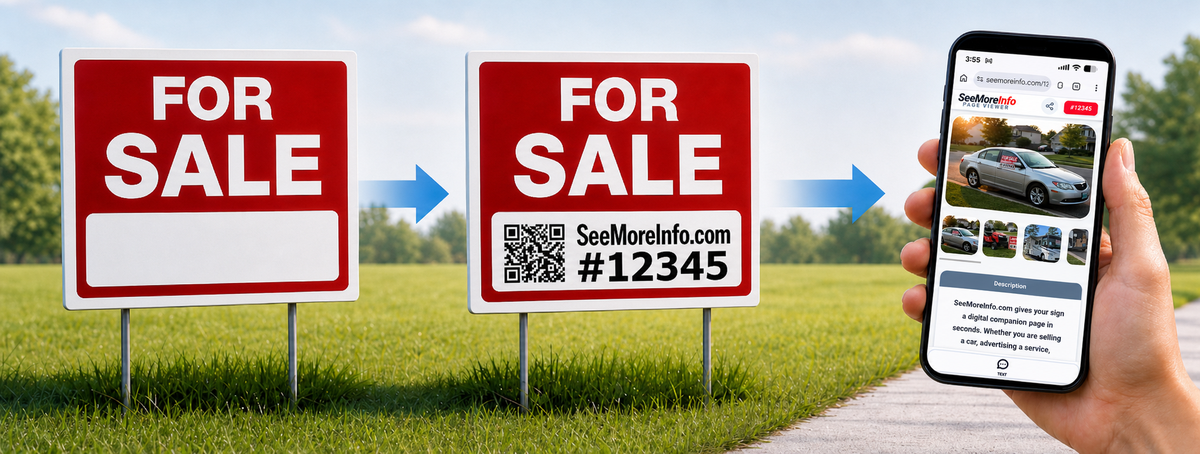
Tell our AI what your sign is for. It builds your page and gives you a code in just a couple minutes. No account needed.
See the SeeMoreInfo Walkthrough.Print custom signs & QR codes using your printer or write SeeMoreInfo.com and your code on a store bought sign.
Try our FREE Custom Sign Maker.Viewers type your code here to see photos, prices, & all of your details that won't fit on your sign - instantly.
View an example page.What Is SeeMoreInfo?
A sign is great for getting attention, but it can only hold so much. SeeMoreInfo gives people a short code they can type in to see the full details on their phone.
Instead of squeezing tiny text, extra photos, directions, updates, and contact details onto one sign, you can keep the sign clean and let the page do the explaining.
Share photos, price, location, updates, notes, contact options, and anything else that would make a sign too crowded or hard to read from a distance.
Your page gets a simple 5-digit code, like 12345. People enter it at SeeMoreInfo.com to view your page instantly, without downloading an app.
The AI helps create the page, so you do not need to design a website. Review it, add photos, make quick edits, and print or write the code on your sign.
Want people to scan your sign from farther away? SeeMoreInfo can create a large QR code you can print on a regular sheet of paper, then tape, laminate, or attach to a yard sign, window sign, poster, or bulletin board notice.
Someone walking or driving by can scan the code with their phone and instantly see more photos, details, updates, and contact information.
In short: your sign gets their attention. SeeMoreInfo gives them the details.
Common Uses
SeeMoreInfo is free and made for real-world signs that people view from their phones. Create the page, add photos, update details, and share it without needing a full website.
Each page can include up to 12 images, helpful details, contact info, updates, and any extra info you want. When you are ready to make a sign, you can create a printable PDF from your phone and print it later.
SeeMoreInfo is designed around the way people actually use signs: they see a sign, pull out their phone, and want quick details without downloading an app or searching around.
AI helps create the page for you, right from your phone. Add photos you already have, take new ones with your camera, edit the details, update contact information, remove sold items, and share the page by text, email, or social media.
You can also create printable sign PDFs from your phone. Printing depends on your setup, but you can email the PDF to yourself and print it later from home, work, a library, or a copy shop.
Good things to know:
No app is required, pages are mobile-friendly, and both the person making the page and the person viewing the sign can use it right from a phone.
A garage sale sign usually only has room for the date, time, address, and maybe an arrow. With SeeMoreInfo, you can keep the sign simple and add a QR code or 5-digit code that opens a full page on someone’s phone.
Add up to 12 images showing furniture, tools, baby items, bikes, collectibles, appliances, clothing lots, or anything else worth highlighting. You can also list sale hours, payment preferences, parking notes, and special instructions.
As things sell, update the page by removing sold items, deleting photos, or changing the description. That makes the page useful during the whole sale instead of being stuck with whatever you printed first.
Good things to add:
Photos of your best items, sale hours, “more items added daily,” large item details, payment notes, rain updates, and whether early birds are welcome.
A “For Sale” sign in a window can only say so much. SeeMoreInfo lets you use the sign to get attention, then use the page to answer the questions buyers usually ask first.
Add photos from different angles, interior pictures, mileage, asking price, year, make, model, features, condition notes, recent repairs, title status, and the best way to contact you.
This is especially helpful for vehicles parked along a road or in a driveway. Someone may see the sign while driving by, scan the QR code, and look at the details later when they are not trying to read tiny writing through a window.
Good things to add:
Front photo, rear photo, side photo, interior photo, dashboard/mileage photo, tire photo, asking price, clean title note, known issues, and recent maintenance.
Large items are hard to explain on a small sign. SeeMoreInfo gives you room for the details people need before they decide to call, text, or stop by.
Use it for couches, tables, appliances, lawn equipment, tools, exercise equipment, office furniture, building materials, or anything else being sold locally.
You can include dimensions, condition, brand, model number, pickup details, whether help is needed to load it, and whether delivery is available. Clear details can cut down on back-and-forth messages.
Good things to add:
Measurements, brand/model, condition notes, close-up photos, pickup instructions, price, whether it is first come first served, and whether the item is heavy.
A lost pet sign needs to be big and readable from a distance, but people may need more details once they stop to help. SeeMoreInfo lets the poster stay bold while the page holds the extra information.
Add multiple photos, the pet’s name, last-seen location, date missing, markings, collar information, personality notes, reward details, and the safest way to contact you.
You can also update the page with possible sightings, search areas, “still missing” updates, or a message when the pet is found.
Good things to add:
Clear face photo, full-body photo, last seen date, nearby cross streets, collar/chip info, temperament, reward note, and sighting updates.
Property signs often get attention, but they do not have room for everything someone wants to know. SeeMoreInfo can help provide more information before someone calls, texts, or stops by.
Add photos, rental terms, room details, parking information, open house times, viewing instructions, contact preferences, application notes, or updates if availability changes.
This can be useful for room rentals, small landlords, private sellers, open houses, parking spots, storage rentals, or other property-related signs.
Good things to add:
Photos, price or rent, availability date, number of rooms, parking notes, pet policy, showing instructions, and the next step for interested people.
Flyers and yard signs are great for getting attention, but they often leave out the details people actually need. A SeeMoreInfo page gives people one simple place to check for more information.
Use it for fundraisers, school events, church events, craft shows, pop-up sales, neighborhood notices, club events, local services, or community announcements.
Add event details, times, location notes, parking information, photos, updates, contact info, and anything people should know before attending.
Good things to add:
Date, time, location, parking notes, cost, schedule, rain date, contact info, photos, and updates if anything changes.
Easy To Share
Someone who sees your sign may not be the buyer, but they may know someone who is. A SeeMoreInfo page is easy to share by text, email, or social media, helping your item reach people who would otherwise never pass by your sign.
Free to create. Easy to update. Up to 12 images per page.
Built for the phone in your pocket and the sign you already have.
Demo Gallery
A few example images showing the kinds of signs and listings SeeMoreInfo can support.


Walkthrough
The walkthrough shows how someone creates a page, saves the passphrase, adds photos, prints signs and QR codes, then previews and shares the finished page.